参考网站
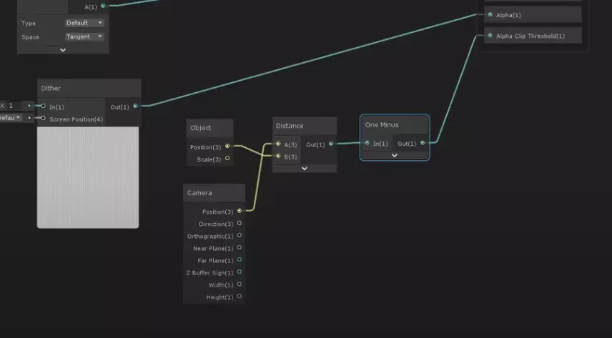
核心代码
- Dither Noise
(% = fmod 取余)
void Unity_Dither_float(float4 ScreenPosition, out float Out)
{
    float2 uv = ScreenPosition.xy * _ScreenParams.xy;
    float DITHER_THRESHOLDS[16] =
    {
        1.0 / 17.0,  9.0 / 17.0,  3.0 / 17.0, 11.0 / 17.0,
        13.0 / 17.0,  5.0 / 17.0, 15.0 / 17.0,  7.0 / 17.0,
        4.0 / 17.0, 12.0 / 17.0,  2.0 / 17.0, 10.0 / 17.0,
        16.0 / 17.0,  8.0 / 17.0, 14.0 / 17.0,  6.0 / 17.0
    };
    uint index = (uint(uv.x) % 4) * 4 + uint(uv.y) % 4;
    Out = 1 - DITHER_THRESHOLDS[index];
}
- 将Noise映射到屏幕
float dither84 = Dither4x4Bayer( fmod(screenPosition.x, 4), fmod(screenPosition.y, 4) );
- 需要一个深度
可以直接用LinearEyeDepth(需要深度图)或算物体与相机的距离
连连看
这边算的是物体和相机的距离,然后减去noise,结果用smoothstep进行微调
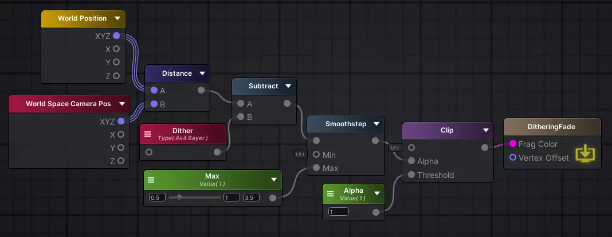
Unilt shader(代码有点问题,连连看连反了)
Shader "ASESampleShaders/DitheringFade"
{
    Properties
    {
        _Distance ("有效距离", float) = 1
    }
    SubShader
    {
        Pass
        {
            Tags { "Queue" = "Geometry" "RenderType" = "Opaque" "RenderPipeline" = "UniversalPipeline" }


            HLSLPROGRAM


            #pragma prefer_hlslcc gles
            #pragma exclude_renderers d3d11_9x


            #pragma vertex vert
            #pragma fragment frag
            #pragma multi_compile_fog


            #include "Packages/com.unity.render-pipelines.universal/ShaderLibrary/Core.hlsl"
            #include "Packages/com.unity.render-pipelines.universal/ShaderLibrary/Lighting.hlsl"


            struct appdata
            {
                float4 positionOS: POSITION;
                float4 color: COLOR;
            };

            struct v2f
            {
                float4 positionHCS: SV_POSITION;
                float3 worldPos: TEXCOORD0;
            };


            CBUFFER_START(UnityPerMaterial)
            half _Distance;
            CBUFFER_END


            inline float Dither4x4Bayer(int x, int y)
            {
                const float dither[ 16 ] = {
                    1, 9, 3, 11,
                    13, 5, 15, 7,
                    4, 12, 2, 10,
                    16, 8, 14, 6
                };
                int r = y * 4 + x;
                return dither[r] / 16; // same # of instructions as pre-dividing due to compiler magic
            }

            v2f vert(appdata v)
            {
                v2f o;
                float4 clipPos = TransformObjectToHClip(v.positionOS);
                o.positionHCS = TransformObjectToHClip(v.positionOS);
                o.worldPos = mul(unity_ObjectToWorld, v.positionOS).xyz;
                return o;
            }

            float4 frag(v2f i): SV_Target
            {
                float3 posObj = TransformObjectToWorld(float3(0, 0, 0));
                float3 WorldPosition = i.worldPos;
                // float2 screenPos = i.positionHCS.xy;// / _ScreenParams.xy;
                // half4 HCS = screenPos / screenPos.w;
                // HCS.z = ( UNITY_NEAR_CLIP_VALUE >= 0 ) ? HCS.z : HCS.z * 0.5 + 0.5; //TODO:more cheap?
                // half2 clipScreen = screenPos.xy;// * _ScreenParams.xy;
                half dither = Dither4x4Bayer(fmod(i.positionHCS.x, 4), fmod(i.positionHCS.y, 4));
                half ditherResult = smoothstep(0, _Distance, (distance(posObj, _WorldSpaceCameraPos) - dither));
                clip(ditherResult - 1);


                return float4(0, 0, 0, 0);
            }
            ENDHLSL
        }
    }
}
另一种适配多位置的方案
inline float Dither4x4Bayer(int x, int y)
{
    const float dither[ 16 ] = {
        1, 9, 3, 11,
        13, 5, 15, 7,
        4, 12, 2, 10,
        16, 8, 14, 6
    };
    int r = y * 4 + x;
    return dither[r] / 16; // same # of instructions as pre-dividing due to compiler magic
}
然后,如果需要两个点作为消失点的话
void DitherClip(Varyings input)
{
half dither = Dither4x4Bayer(fmod(input.positionCS.x, 4), fmod(input.positionCS.y, 4));
half clipValue = smoothstep(0, _DitherAmount, (distance(input.positionWSAndFogFactor.xz, _WorldSpaceCameraPos.xz) - dither));
// 1和2是为了适配两个固定的消失点,用min取最小值。此时上面的clipValue是失效的
half clipValue1 = smoothstep(0, _DitherAmount, (distance(_CarDitherPos.xy, input.positionWSAndFogFactor.xz) - dither));
half clipValue2 = smoothstep(0, _DitherAmount, (distance(_CarDitherPos.zw, input.positionWSAndFogFactor.xz) - dither));
clipValue = min(clipValue1,clipValue2);
clip(clipValue - 1);
}
ps里使用也比较简单

为什么取min呢
测试过可以发现,clip() 函数剔除的是 > 0 的部分
消除色阶
Dithering:使用8-bit dithering像素点抖动技术,消除色阶。
https://zhuanlan.zhihu.com/p/84434802
https://bartwronski.com/2016/10/30/dithering-in-games-mini-series/
补充方案
射线检测对象是否在后面然后材质改成透明